


Kids, especially teens, usually argue with parents about setting screen time limits and claim to be unfair. If you’re also facing the same scenario, then don’t worry! You can develop a device usage reports feature to help reduce such conflicts. In this article, we’ll discuss in detail what usage reports actually reveal and how they prove beneficial in reducing arguments and setting reasonable limits. Keep reading!
Why screen time arguments happen in the first place?
Screen time arguments often arise among parents and teens, usually when both have different expectations about device usage. Pew Research Center has also conducted a survey regarding how parents and teens approach screen time. This survey findings has revealed that almost 38% of surveyed parents and teens say they sometimes argue about how much time the teen spends on their phone.
Let’s dive deeper and have a close look at some reasons why such arguments happen in first place!

Psychological reactance
Remember! Entertaining apps are especially designed to keep users engaged because of their quick reward system or new content. Such activities continuously cause a release of dopamine (the “feel-good” hormone) in the brain. If parents ever ask kids to put their devices away without any prior warning, their enjoying experience gets spoiled. This not only results in bad behavior in them but also a genuine neurological distress response.
Communication breakdowns
Honestly speaking! Arguments usually happen among parents and teens when there’s a communication gap. As a result, parents just assume that their kids know when to stop using devices. Kids, on the other side may believe they have just a few more minutes. That’s why you need to make kids clearly understand the rules and tell reasons why such rules exist.
The autonomy struggle
Furthermore, as kids grow, especially during adolescence period, they naturally want freedom & privacy. In this case, if parents put strict limits, it may feel like an invasion to independence, causing teens to resist even the reasonable rules.
Perceived unfairness
Last but not least, kids when see their friends or siblings using devices for more time. They usually argue that it is totally unfair, so you have to clearly explain the family rules to reduce the feeling of unfairness.
What usage reports actually show?
Parents usually focus on total screen time, ignoring what they were doing, whether using it for productive or recreational purposes. Suppose there are two kids who each spend 3 hours on phones; now you can’t impose restrictions based on this screen time alone.
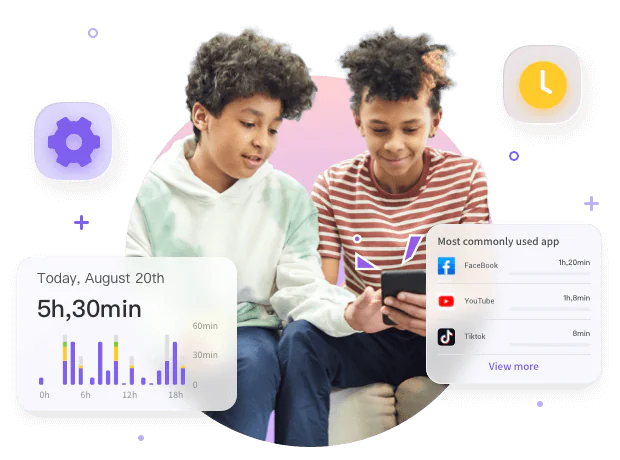
This is because maybe one kid is spending time attending online classes, completing homework or reading educational content. While other one might spend the same amount of time scrolling social media or playing games. Thereby, ignoring this important difference might lead to unfair decisions, which later on lead to arguments.
However, when you have app usage reports in front, its gives you a clear picture of app-by-app activity. For instance, you’ll get to know which apps your kids have used, how often kids opened them, and how much time they spent on each one. Thereby helping you target the actual distractions while keeping productive tools intact.
Daily usage insights help tailor limits fairly.
Although there are built-in parental controls on smartphones, providing information about kids screen time. However, to get a detailed summary report about how your kids have use their devices the whole day, you can try installing the FlashGet Kids parental control app. It not only displays total screen time at above but also how often they open each app, their usage duration and patterns. This way, you can create screen time rules based on actual usage instead of just guessing.
How usage reports reduce arguments
It’s also most commonly seen that parents set screen time rules by own without having a clear picture of their kids digital habits. According to a University of Michigan study published in Pediatrics (2025), only 1/3rd of parents accurately estimated their kids’ mobile screen time, with most either underestimating or overestimating.
However, we are all aware of the fact that guessing doesn’t always work. Without reviewing app usage reports themselves, you can’t say with certainty whether kids are just wasting time or using it for educational purposes. For instance;
Replacing opinion with fact
First of all, usage reports indeed replace your gut feelings or memory-based assumptions with objective factual data. This way instead of saying you’re always on the phone, you can have reasonable conversations regarding app usage patterns.
For instance, noticing that kids constantly switch between homework apps and recreational apps, lets you explain that multitasking just diverts their attention. Because your discussions are based on facts, kids are more likely to understand and follow instead of arguments.
Establishing accountability
In addition, usage reports actually create a sense of accountability among parents and teens. For instance, when kids know that their parents will review their screen usage in front of them, they remain more mindful of how they use devices. Likewise, parents can base their decisions based on actual data, making screen time rules feel more transparent.
How should parents interpret app usage before setting screen time limits?
As already discussed, not every minute spent on screens is the same for all kids. That’s why the American Academy of Pediatrics in its guidelines (2025) suggests considering how kids make use of screens, instead of simply counting the number of hours spent on screens.
Below, we’ll discuss some tips to help you interpret app usage by kids for fair screen time decisions.
Look at the purpose of each app
Not all apps on mobile phones or tablets are the same; some apps directly support learning, while others are solely for recreational purposes. For instance, there are educational apps like Microsoft Teams, LMS, Khan Academy, etc that need more flexibility since they directly support classwork.
Likewise, kids usually use messaging apps while doing homework to connect with teachers or group fellows. However, they receive constant message notifications that divert all their attention. Moreover, if talk about games, it wouldn’t be harmful at all; if they do a short entertaining session just during free time. In contrast, if kids play games or scroll for long hours without noticing how much time they have spent can lead to screen addiction issues.
Check patterns, not just one busy day
Remember! One unusually busy day like preparing exam, doesn’t decide all days’ routine. If there are weekends or school holidays, then your kids wouldn’t follow the normal school routine of restricted screen hours. That’s why parents before making screen time rules you should review consistent patterns, usually monthly.
Compare usage with daily responsibilities
In addition, consider whether your set screen use is affecting important responsibilities. For instance, if entertaining apps are regularly interfering wth your kids’ homework or sleeping, then its time to set healthy boundaries.
Practical strategies parents can use to solve the conflict
Just relying on technology to see the app usage report isn’t enough at all to solve the family disagreements. This is because your goal isn’t just to catch your kids’ mistakes instead you should understand their digital habits to create fair rules. Here are some practical strategies that might prove helpful in this regard!
Turn the report into a discussion, not an interrogation
Once you review the report, don’t just go right to decisions; instead, first ask your kid to explain the usage. When kids start telling, you can guide them about healthy digital practices. It’s noteworthy that starting with curiosity instead of criticism indeed helps encourage honest conversations
Decide which apps support daily responsibilities
Next you’ll think which apps are interfering with kids’ daily responsibilities or which are supporting. Instead of saying you’ve just 2 hours to spend on the phone, create rules based on app categories.
For instance you can give more freedom of usage on apps that support education compared to recreational apps.
Address multitasking before reducing screen time
Furthermore, if the usage report tells that kids frequently switch between app esepeally homework or social media, then there isn’t a problem with excessive screen time. Instead, you should talk to kids to complete one task first before opening the next apps to avoid distraction.
Respond to unhealthy patterns gradually
If the usage report tells that the entertaining apps take most of your kids’ day, never impose strict restrictions immediately. This is because kids would indeed cooperate with you if they are clearly aware why you’re imposing such boundaries. That’s why first talk to kids and then gradually set rules like reducing gaming before bedtime or limiting social media during homework, etc.
Conclusion
In short, having a report about how kids make use of devices helps reduce family arguments by letting parents make fact-based screen time rules. This is because instead of relying on assumptions, now parents can understand which, when and how kids have used apps.
However, having a usage report in hand doesn’t automatically solve the conflicts at all. The thing that actually matters is how you use this information. Always use this report data to start respectful conversations & set realistic expectations. This makes the screen time rules less about control and more about helping kids develop healthy screen time habits.



